Kann mir schwer vorstellen dass das Problem nicht über die LARA zu lösen ist
Beiträge von seegras
-
-
Die Crux liegt im www. davor
-
Liegt dadran dass schlicht und ergreifend für http://www.sa-mp.de kein DNS Eintrag vorliegt, das könnte der Xunil: vielleich nochmal fixen wenn er das hier liest - Ansonsten einfach das www. weglassen

-
Warum wird so eine Seite erst vorgestellt und dann der Inhalt auf die Seite gebracht? Einfach mal vorher ein paar Bekannte über die Seite drüber schauen lassen damit sowas nicht passiert

-
Das fand tatsächlich statt
-
Keiner konnte das ganze runterladen, die Daten wurden sofort wieder rausgenommen
Trotzdem möchte ich mich für den kurzen Schrecken entschuldigen
-
Viele hätten es nicht für möglich gehalten, aber unsere "geplante Neuausrichtung" war nur unser diesjähriger (wenn auch lascher) Beitrag zum 1. April
April, April!!!
Wir hatten zu keinem Zeitpunkt vor dies wirklich in die Tat umzusetzen und möchten natürlich auch nicht dass deswegen User bei uns ihre Mitgliedschaft kündigen
-
Die Antwort hast du dir schon gegeben
-
Netflix und Amazon Prime Instant Video
-
So isses, entweder einen Festpreis eintragen oder das Thema schliessen lassen
-
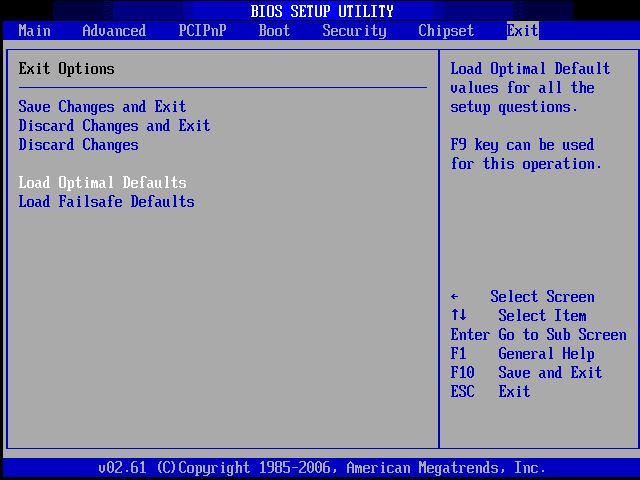
Das wäre z.b. die Option um die Einstellungen zurückzusetzen, was für ein BIOS hast du eigentlich überhaupt? (Steht irgendwo, meistens am oberen Rand)
-
Naja ich glaube du vertiefst dich da in etwas, ich hoffe nicht dass du vorhast diese Drucken zu lassen und zu verteilen.
Das wollte ich auch grad sagen, für den Druck total ungeeignet da einfach die komplette Fläche gefüllt ist (bedruckt wird); sieht mMn nicht professionell aus
-
Es gibt eine Kategorie in der du deine Änderungen speichern kannst, dort gibt es dann auch einen Punkt "Load Defaults" oder "Load Optimal Defaults"
-
Gibt verschiedene Wege
- Direkt im BIOS gibts eine Möglichkeit die Settings auf Default zu setzen
- Manche Mainboard haben an der Rückseite (da wo die Anschlüsse sitzen) oder direkt auf dem Mainboard einen Taster "Reset CMOS"
- Oder direkt die kleine Knopfzelle (Batterie) kurz rausnehmen und wieder reinsetzen (Vorher den PC ausschalten, sich selber Erden und dann den PC öffnen und die Batterie entfernen)
-
Wenn das Seitenteil eh offen ist, ist deine Theorie mit der Luftzirkulation eh hinfällig
-
Ich nehm mal an er meinte es so "einen Lüfter abstecken, hören, wieder einstecken, nächsten Lüfter ab..."
-
Hört sich nach nem ausgeschlagenen Lager eines Lüfters an, evtl kann man das Geräusch auch im Video nur schlecht hören - Wenns ein helles Pfeifen ist kanns auch das "Spulenfiepen" sein (einfach mal danach Googlen)
-
Schade dass einige User meinen die Community verlassen zu müssen wegen unserer Neuausrichtung, ein wenig mehr Engagement im Caritativen Bereich der Tiere wäre sicherlich eine tolle Sache
-
Was passiert mit der Domain? Denn sa-mp.de passt dann ja nicht mehr. Also, wird dann nur noch breadfish.de benutzt oder kommen da noch welche dazu?
Würde sonst auch gerne die Domain sa-mp.de aufkaufen wenn sie dann nicht mehr benötigt wird..die Domian wird in unserem Besitz bleiben, weil sie a) eine gute Verbreitung hat und b) um Nachahmerforen zu vermeiden
-
Ich schau nachher mal ob ich das Teil noch aufm Notebook hab, vielleicht kann ich dir dann damit weiterhelfen